Operator API Collections
3 minute read
Intro
The Marketplacer Operator API collections have been provided to get developers new to Markerplacer up and running quickly with the Operator API by providing a curated set of the most commonly used queries and mutations. Collections have been provided for both Postman and Insomnia.
Note
The curated list of queries and mutations found in the collections cover the vast majority of common uses cases a developer using the Operator API would be required to know. However you should note that we don’t aim to:
- Provide examples for every possible permutation of use (e.g. examples with every query filter )
- Provide examples for every query and mutation available
Full API reference coverage can be found here in our reference docs.
Downloads
When developing against the Operator API, you can use a number of different API Test clients to make your life easier, for example:
We have created API collections for both Postman and Insomnia, which can be downloaded below.
- Download the Postman Collection for the Operator API here.
- Download the Insomnia Collection for the Operator API here.
Postman
Postman is a tool for developing and testing API integrations. It provides an interface for exploring APIs and executing requests against them. You can download our Postman Collection here.
Postman Setup Video
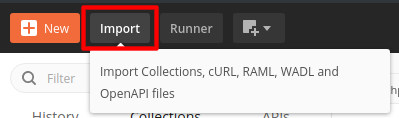
If you prefer video to the written word we have step by step setup instructions for Postman here.To import into Postman, download the .json file and go to the import menu in Postman:
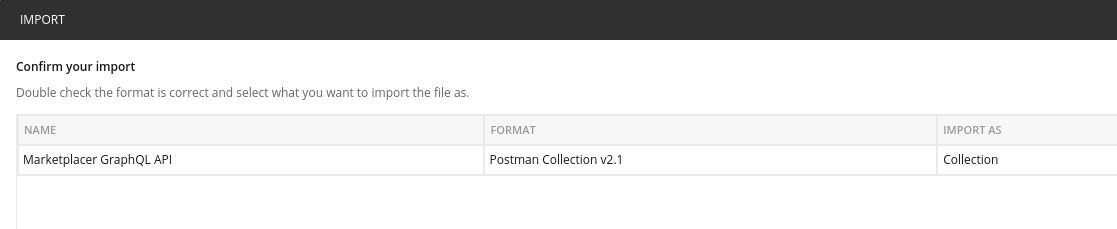
Choose the .json file you downloaded and confirm that you wish to import it:
Edit the collection to fill in the variables required to access your site (see the Postman documentation for more information)):
| Variable | Example value |
|---|---|
base_url | https://bestfriendbazaar.com/graphql |
api_key | Your API key |
The collection sends api_key as a Bearer token in the Authorization header.
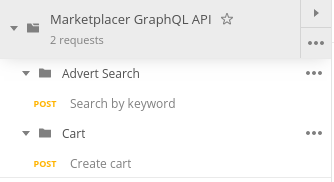
You will now see a series of requests in Postman which you can study and execute:
Insomnia
Insomnia is an alternative API client that can be used to run GraphQL queries and mutations in much the same way as Postman. Insomnia is particularly good at working with GraphQL as it ingests the GraphQL schema, enabling it to provide tool-tips, auto-code completion and present the in-line API documentation. Our Insomnia Collection can be downloaded here
Insomnia Setup Video
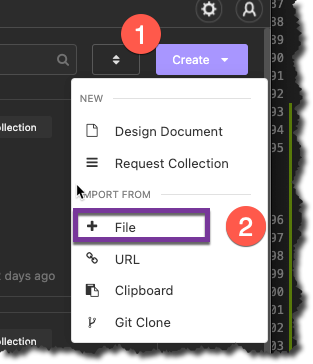
If you prefer video to the written word we have step by step setup instructions for Insomnia here.To import, click the “Create” button on the Insomnia Dashboard, and select “(Import From) File”:
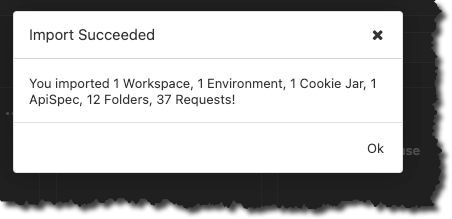
Select the Marketplacer GraphQL API.insomnia_collection.json file you downloaded in the previous step, and click ok. You should see the confirmation once the file has imported:
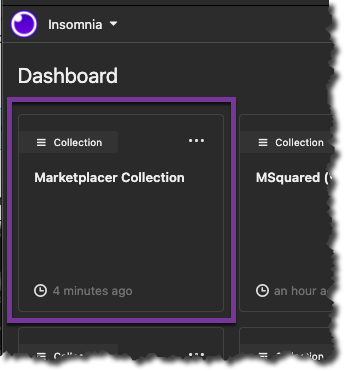
Select the “Marketplacer Collection”
We now need to configure the base environment to:
- Point to your Marketplacer GraphQL API endpoint
- Use your API Key
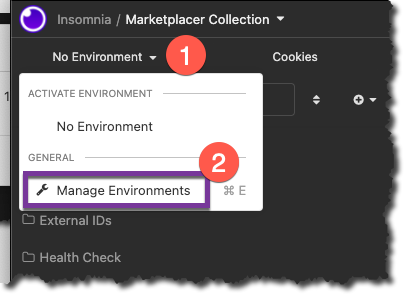
To do so, click the Environment drop down, then select Manage Environments:
You’ll need to provide values for:
base_urlapi_key
The collection sends api_key as a Bearer token in the Authorization header.
An example of what your base environment config should look like is shown below (don’t forget to click “Done” after making any changes):
{
  "base_url": "https://bestfriendbazaar.com/graphql",
  "api_key": "8c1aa7421fd2ea6538763a09b68766d"
}
Note
The configuration values used above are obviously just examples, you’ll need to plug in values relevant to your environment, obtaining these values are described here.You should now be able to start using the Insomnia Collection.